Job Posting ETL Pipeline
Automated and fully reproducible ETL pipeline for extracting and standardizing job posting skill mentions, loaded and normalized in a SQL Server database.
Automated and fully reproducible ETL pipeline for extracting and standardizing job posting skill mentions, loaded and normalized in a SQL Server database.

Core Features
Key Technologies
Pipeline Metrics
The pipeline documentation is organized into the following sections:
The ETL pipeline takes a collection of annotated job postings as input and extracts the metadata and highlighted skill mentions from each posting. The original dataset comprises 36 job postings that are kept private in order to comply with copyright and Terms of Service regulations.
Instead, a functionally identical dataset of 36 synthetic job postings was carefully engineered, producing the same pipeline output as the real dataset. The synthetic dataset ensures that the end-to-end ETL pipeline is publicly shareable and fully reproducible, without exposing copyrighted material.
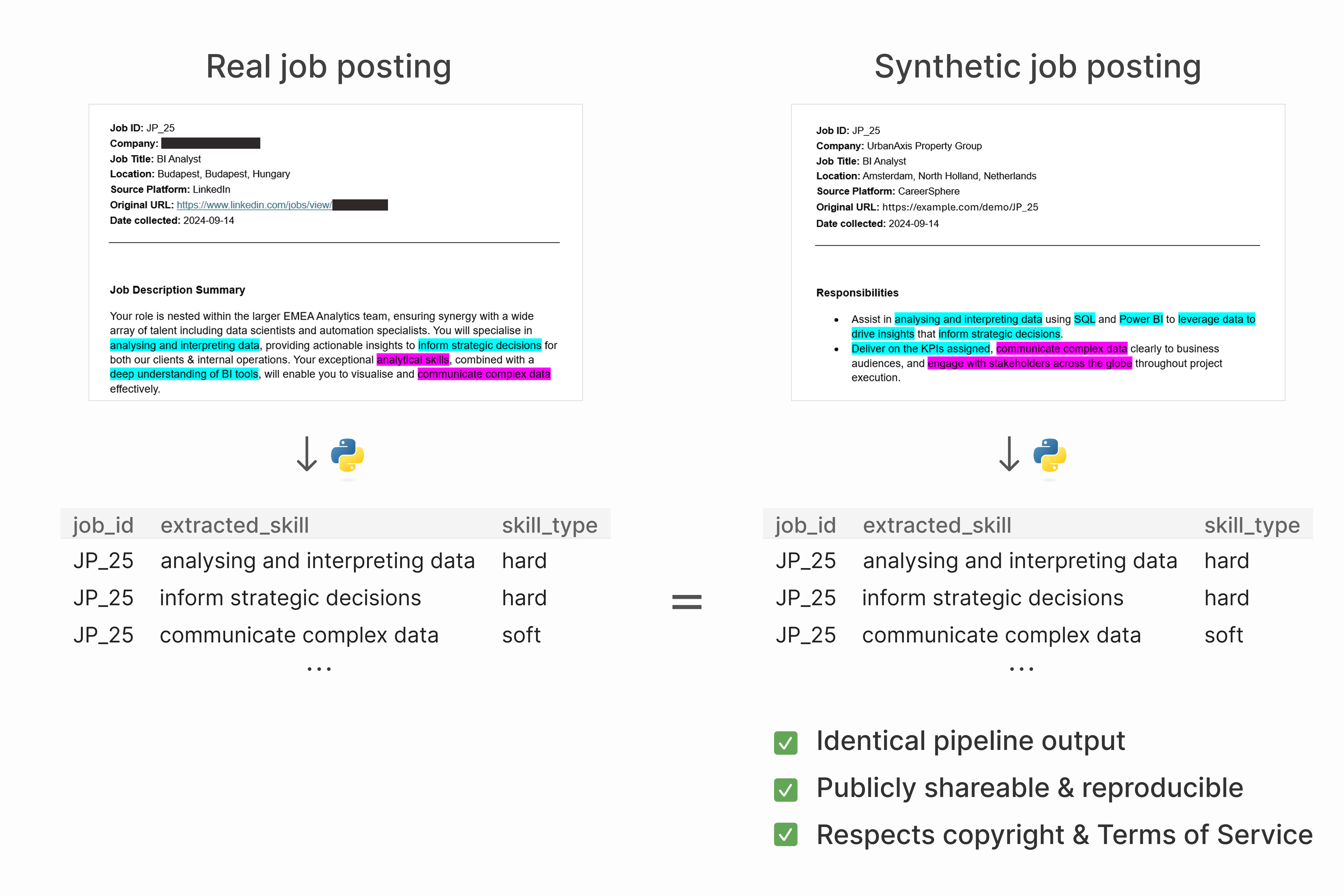
Skill mentions are identified and highlighted manually within each job posting, using turquoise to highlight hard skills and pink to highlight soft skills.
A Python script parses and extracts the highlighted skill mentions, independent of the surrounding sentence context. Consequently, a real and a synthetic job posting can produce an identical set of extracted skill mentions despite having different surrounding text.
In the example below, the pipeline extracts the record JP_25, analysing and interpreting data, hard from both the real
and synthetic job postings, while the synthetic version avoids redistributing copyrighted material.
For every real job posting (36 in total), a synthetic version was carefully constructed. A fictional company name and a new location is assigned to every real company in the original dataset. This enables company-level frequency analysis without exposing real organizations.
The Python extraction script would first process the real job posting, and the list of extracted skill mentions would then be used to create a synthetic job posting using the following Chat GPT prompt template:
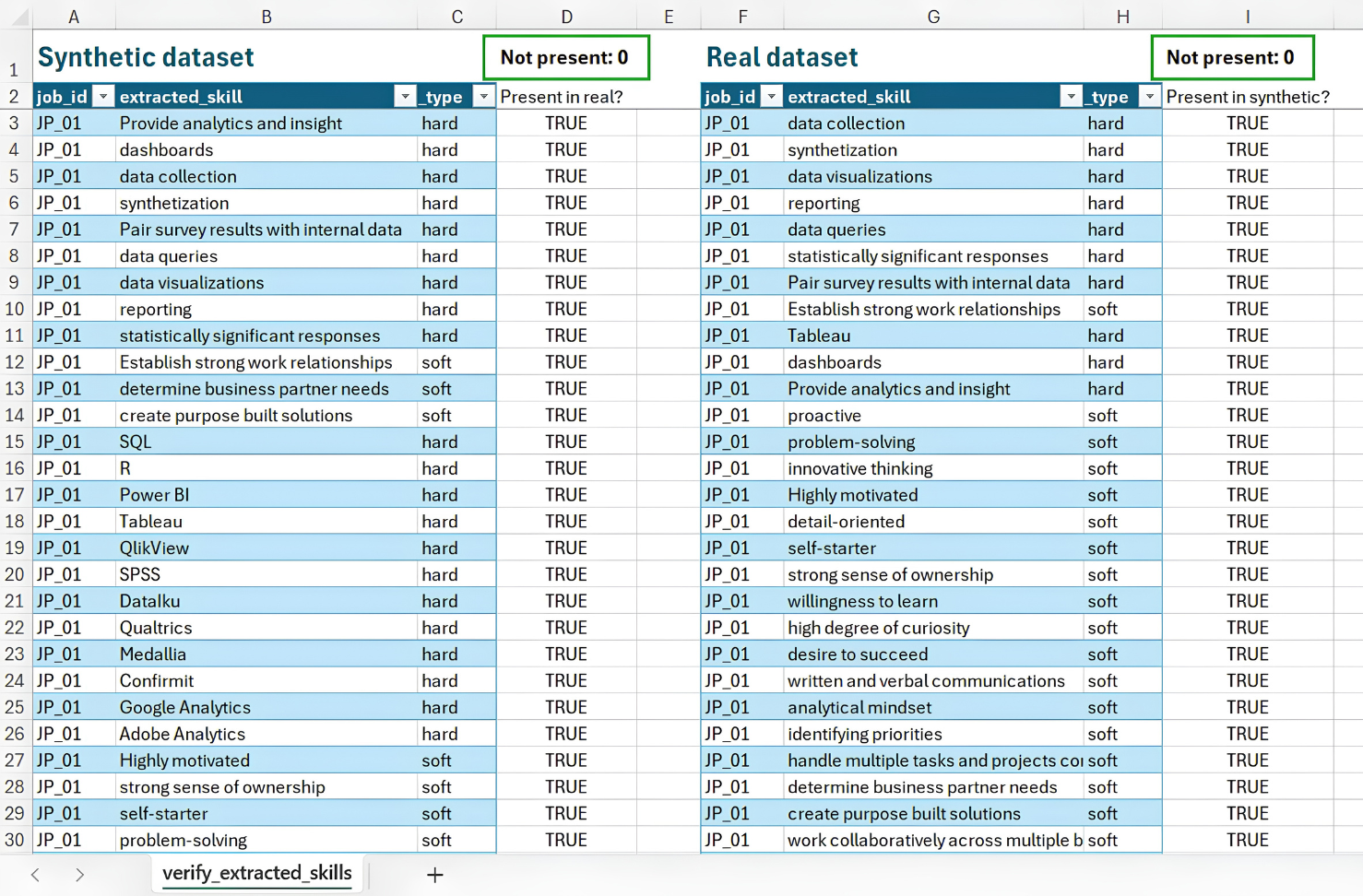
The equivalence between the real and synthetic datasets is verified using an Excel workbook that imports the extracted CSV files from both datasets and checks that every skill mention extracted from the synthetic dataset exists in the real dataset, and vice versa.
Skill requirements across job postings are expressed in highly variable surface forms. Differences in formatting (e.g., “Power BI” vs “PowerBI”) or phrasing (e.g., “multi-tasking” vs “handling multiple tasks concurrently”) cause misleading frequency counts and unreliable aggregations.
As a result, extracted skill mentions cannot be used directly for structured skill demand analysis without a prior standardization process.
To address this issue, I designed a taxonomy-driven standardization system in Excel for downstream analytical use that transforms raw skill mentions into standardized skills enriched with hierarchical skill classification.
The full documentation is available in the dedicated Skill Standardization System project page.
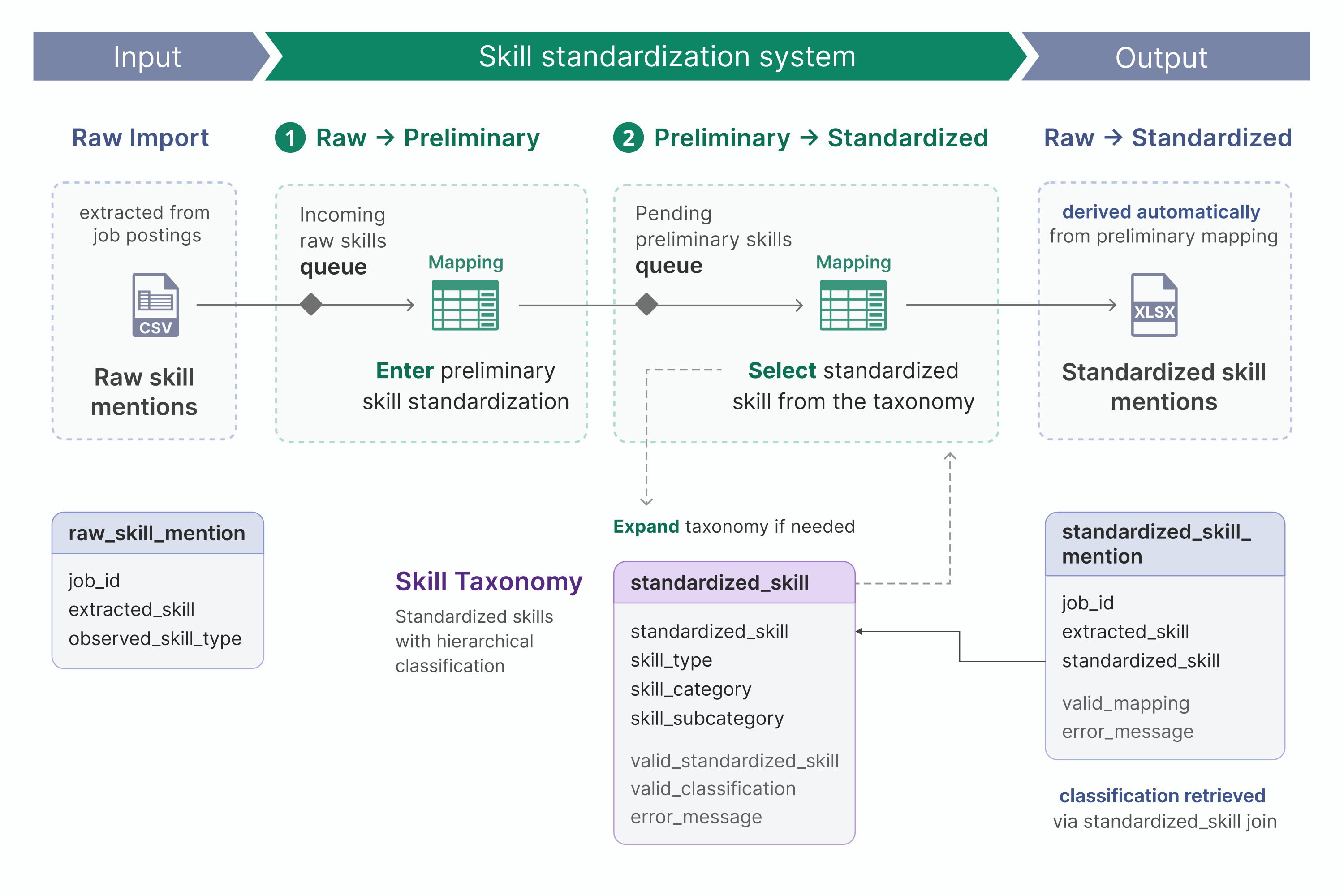
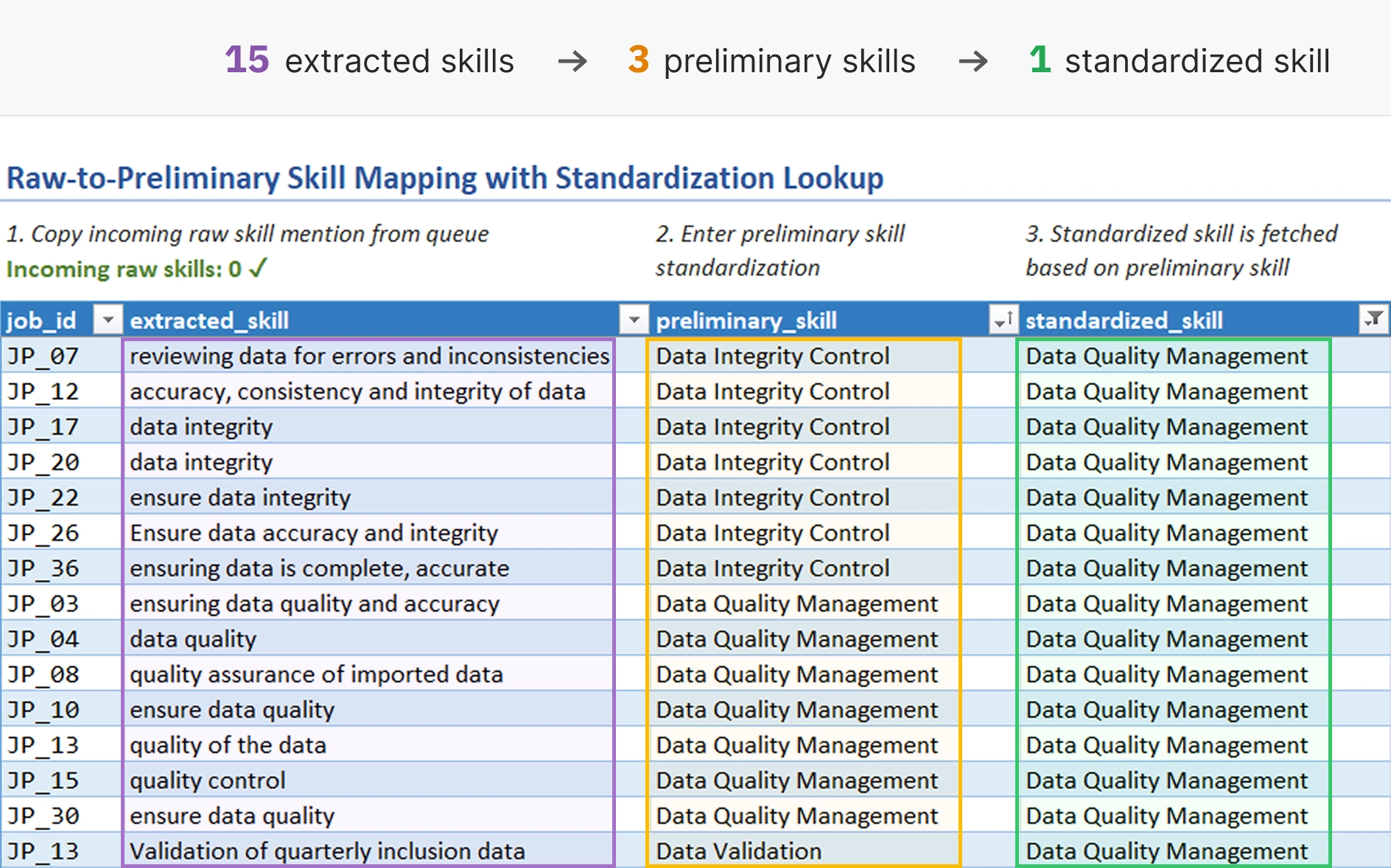
The skill standardization system transforms raw skill mentions into standardized skills through a two-stage mapping workflow.
For each raw extracted_skill, the user first enters a preliminary
standardization. Then, for each unique preliminary_skill, the user selects a
standardized_skill from a controlled skill taxonomy. The taxonomy can be
expanded as needed with additional standardized skills classified by their skill type (hard
or soft), category, and subcategory.
The final standardized skill is fetched automatically via the preliminary mapping layer, which helps prevent inconsistent mappings and enables systematic updates.
The skill standardization system produces a standardized analytical dataset that transforms variable skill mentions into validated, taxonomy-classified records, suitable for downstream analysis and visualization.
Each standardized record is defined by the following fields:
job_id: Unique job posting identifier
extracted_skill: Exact skill phrase extracted from the original job posting
standardized_skill: Standardized skill phrase
skill_type: Standardized skill type (hard or soft)
skill_category: Main skill category
skill_subcategory: Skill subcategory
Additionally, each record contains validation metadata used for excluding invalid records from analysis:
valid_mapping = TRUE
valid_standardized_skill = TRUE
valid_classification = TRUE
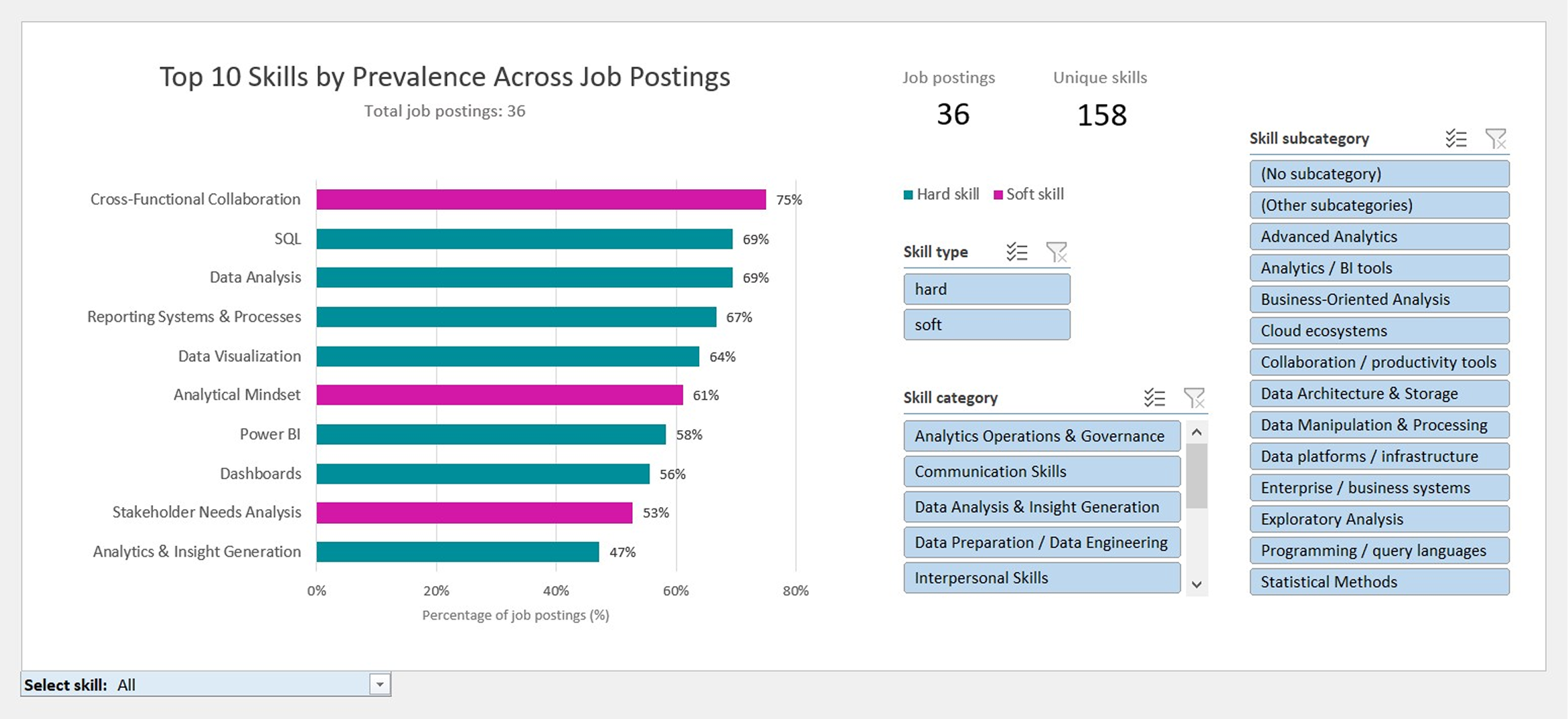
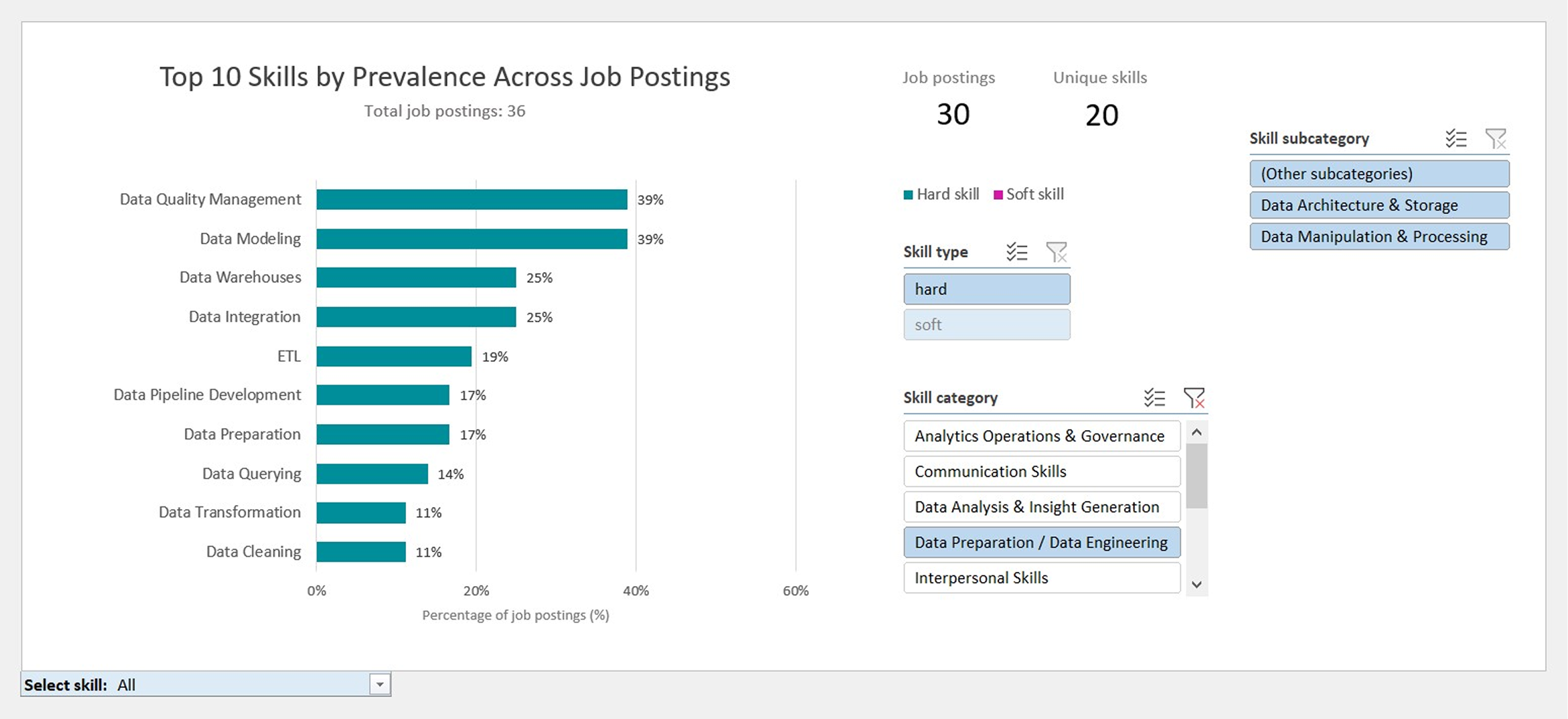
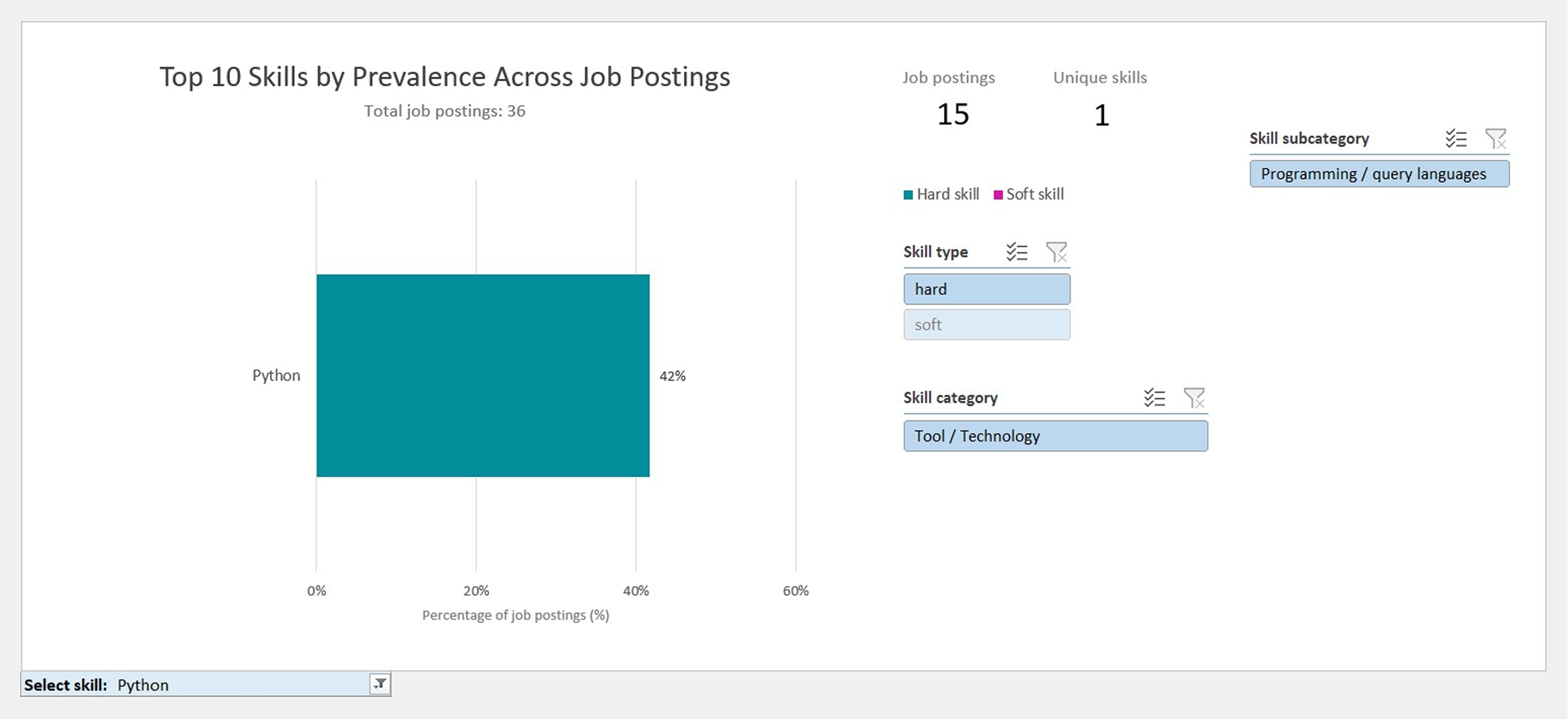
The following interactive dashboard was built directly in Excel using the standardized dataset, enabling multidimensional exploration of skill demand across the analyzed job postings.
Two Python scripts automate extraction from the annotated Word job posting documents and the Excel skill standardization workbook.
The two extraction scripts together produce the structured data required for downstream analysis:
Job posting metadata identifying each job posting (e.g. company, location).
Raw skill mentions that occur in specific job postings (e.g. “PowerBI” in JP_27).
Standardized skills mapping each raw skill mention to its standardized form (e.g. PowerBI → Power BI).
Skill classifications for each standardized skill (e.g. Power BI → hard skill → Tool / Technology → Analytics / BI tools).
The resulting CSV files form a structured, reproducible dataset used as input for the SQL Server database and serve as the basis for subsequent skill-demand analysis.
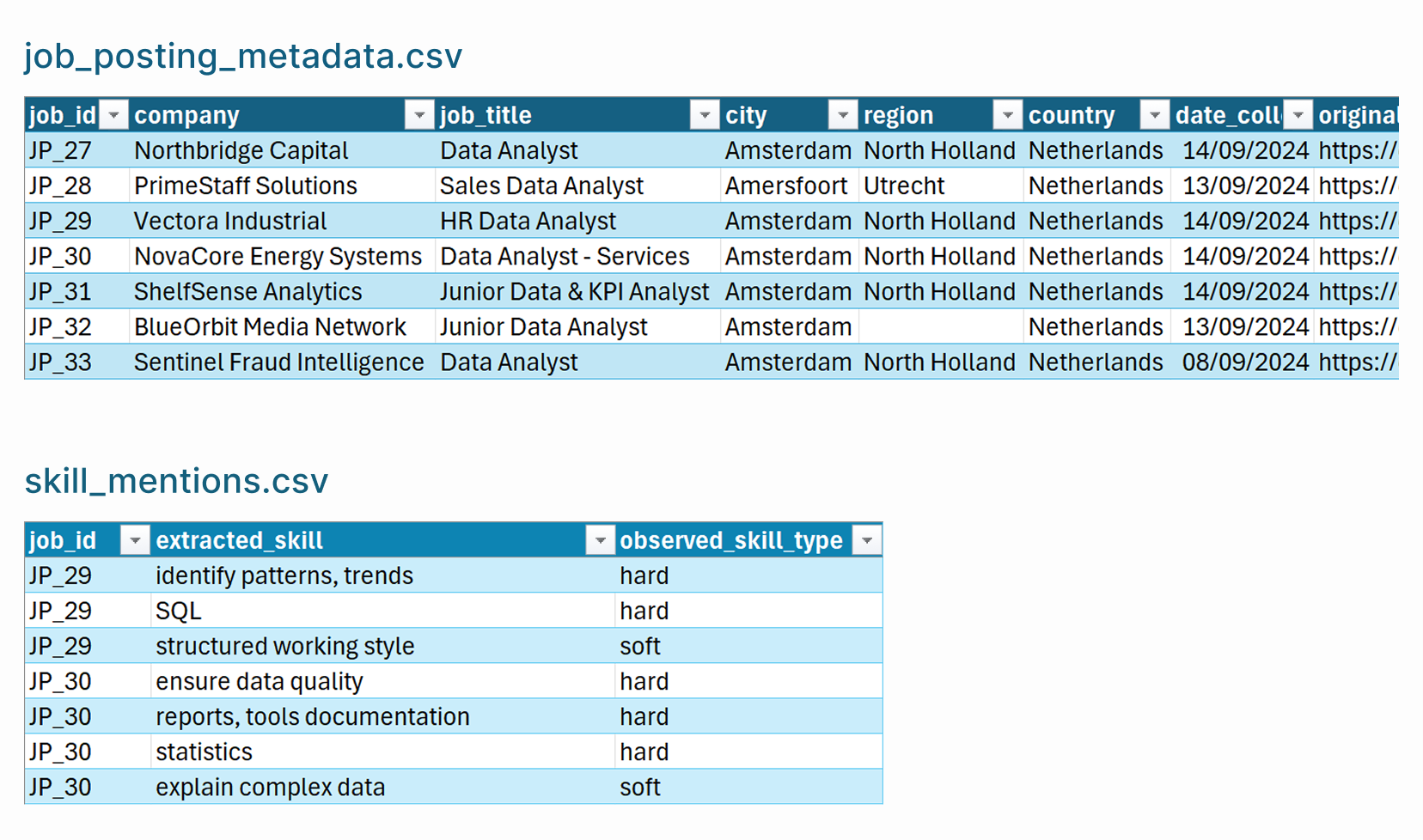
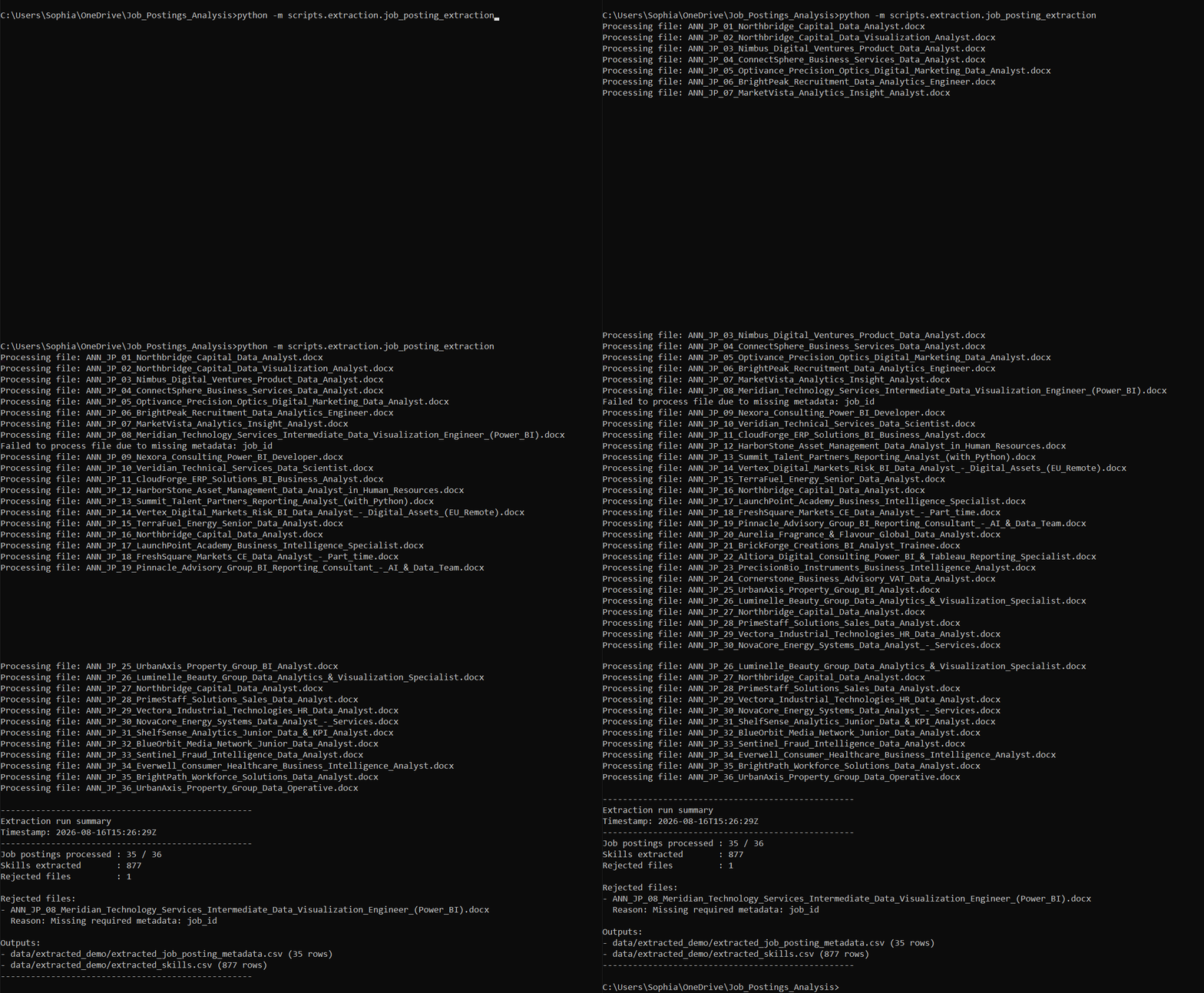
This Python script loops over a directory of annotated job posting (.docx) files and for each job posting:
then writes the results to two separate CSV files.
Skill mentions are highlighted manually during the annotation process and are then extracted programmatically
from each job posting. Highlight color determines the observed_skill_type, using turquoise for
hard skills and pink for soft skills.
Job postings often list the same skill twice but the script ignores duplicates since it tracks whether a skill
appears in a job post, rather than the number of times it is listed in a single document.
A predefined metadata schema is used for job posting extraction and validation. Every job posting must have
the following mandatory fields: job_id, company, and job_title. Files
missing any required job posting metadata are rejected and logged in the console output.
This Python script extracts three named tables from the Excel skill standardization workbook and writes the results to three separate CSV files:
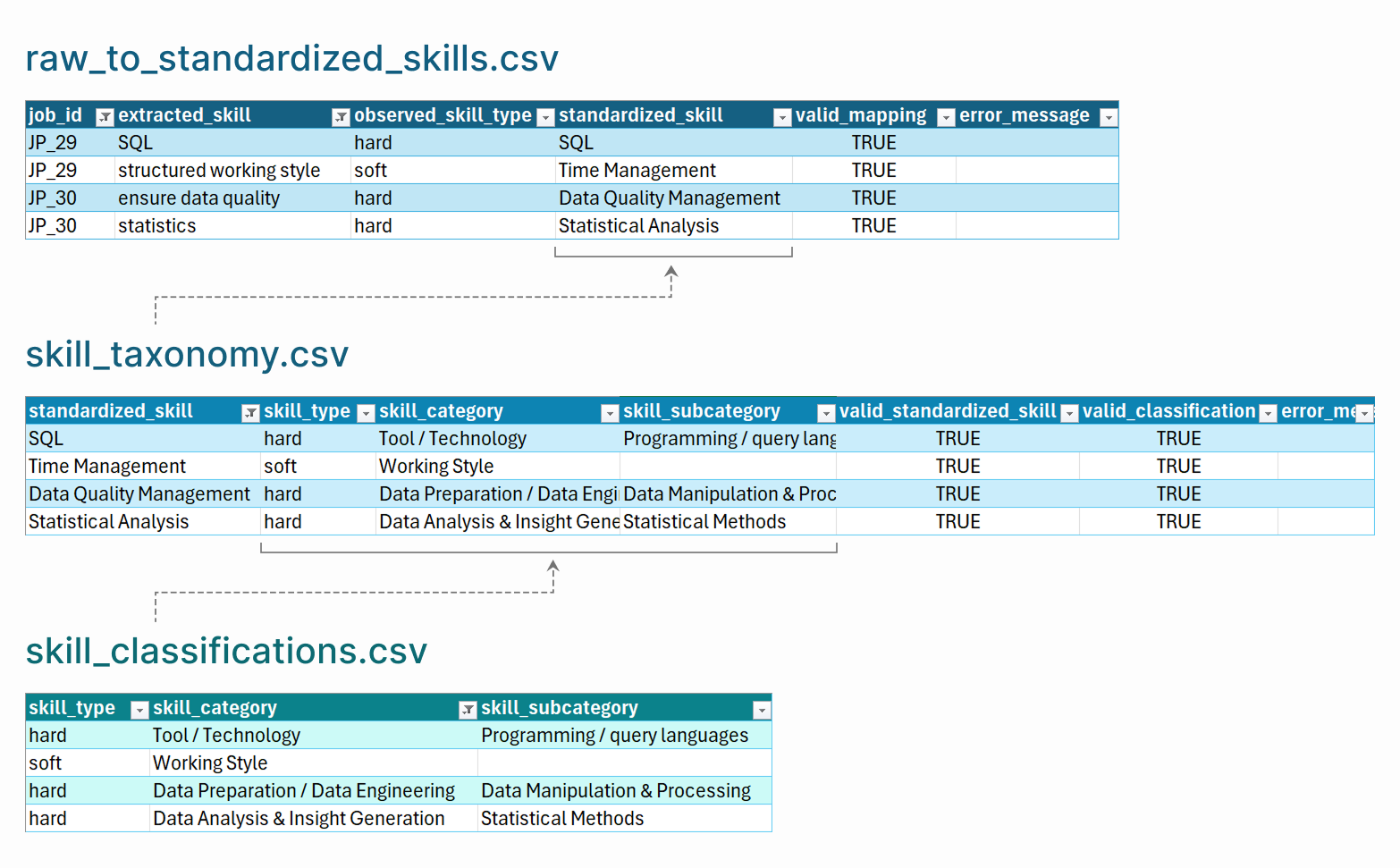
The tables contain row-level validation metadata: valid_mapping, valid_standardized_skill,
and valid_classification. These fields are included in the CSV exports and later used in SQL Server to
filter out invalid records from analyses.
The JobPostingsAnalysis database is hosted in SQL Server and is organized into two schemas – staging and core – each
serving a distinct role in the data pipeline.
The staging schema preserves the source data imported with each load, including validation metadata,
error messages, and missing or duplicate values. Each load is assigned a unique identifier, enabling the investigation
of data-quality issues across historical loads. Fields such as observed_skill_type and
preliminary_skill also provide insight into the skill standardization process.
The core schema represents the outcome of a process in which skills are identified → extracted → standardized → stored
in a relational model. It stores data from the latest load that has passed the defined validation and
standardization rules. The data is organized into normalized tables with enforced
relationships and constraints, providing a consistent foundation for downstream skill demand analysis.

The staging schema is defined in a SQL script that creates four landing tables for the input CSV datasets:
job_posting_metadata: each row represents a job posting and its corresponding metadata,
such as company, location, and job title.
standardized_raw_skills: each row represents an extracted skill, its standardized form,
and mapping validation metadata.
skill_taxonomy: each row represents a standardized skill and its classification by skill type,
skill category, and skill subcategory, together with validation metadata.
skill_classifications: each row represents an approved combination of skill type, category, and
subcategory.

The staging schema appends each incoming load while preserving previous ones, enabling comparisons between historical loads and facilitating the investigation of potential data-quality issues. Each record in staging is assigned:
load_run_id: unique identifier generated for each load run, identifying all records
belonging to the same load. A timestamp alone is insufficient for this purpose since a single load may span
multiple timestamps.
loaded_at: timestamp recording when each record is loaded, which helps identify the most recent
load through its associated load_run_id.
Loading data into the staging schema is executed by a
SQL script
within a single TRANSACTION. If an error occurs at any point during the load, the transaction is
rolled back. This ensures that the source data – consisting of multiple CSV files – is captured as a complete
snapshot at the time of each load, preventing partial data loads.
First, a new load_run_id is generated which is shared by every record inserted during the current load.
Then, for each staging table:
load_run_id field.
BULK INSERT, with the file path resolved
through the $(PROJECT_ROOT) variable passed by the Python pipeline orchestrator.
load_run_id being applied to every row.
The following query demonstrates how the staging schema can be used to investigate data quality across historical loads. A skill record from the latest load has an invalid mapping, preventing it from being included in the final analytical dataset. The validation metadata stored by the staging model helps identify the reason for the failure, and comparison with previous successful loads provides historical context.
Results:
loaded_at      job_id  extracted  preliminary  standardized  valid_mapping  error_message              load_run_id
-------------  ------  ---------  -----------  ------------  -------------  -----------------------    -----------
Oct 11, 12:42  JP_26   Tableau    Tableau      Tableau       1              NULL                       497D7976...
Oct 11, 18:53  JP_26   Tableau    Tableau      Tableau       1              NULL                       CB81D73E...
Oct 12, 11:00  JP_26   Tableau    Tableau      Tableau       1              NULL                       4DEFD1AE...
Oct 12, 12:15  JP_26   Tableau    NULL         NULL          0              Empty preliminary skill    CFAA3A25...
The core schema is defined in a SQL script that creates six normalized relational tables:
companies: each row represents a unique company.
locations: each row represents a unique location, defined by city and country,
with an optional region.
job_postings: each row represents a unique job posting, defined at least by job ID,
job title, company, and location.
skill_classifications: each row represents an approved combination of skill type
(hard or soft), skill category, and subcategory.
standardized_skills: each row represents a unique standardized skill and its
classification by skill type, skill category, and skill subcategory.
skill_mentions: each row represents a unique skill mention, defined by the job
posting it occurred in, the original skill phrase extracted from the job posting, and the
standardized skill assigned during standardization.

Loading data into the core schema is performed in two phases within a single SQL script :
The full load script is executed within a single TRANSACTION, so that if an error occurs at
any point during the load, the entire transaction is rolled back. This prevents partial deletion or insertion
of data, ensuring that the core schema is a complete representation of the latest validated and normalized data.
Phase 1 (Deletion)
Before loading the latest staging records, the script first deletes all records from core that have become stale or invalid.
-- Delete stale companies
DELETE c
FROM core.companies AS c
WHERE NOT EXISTS (
   SELECT 1
   FROM staging.job_posting_metadata AS s
   WHERE s.company = c.company
      AND s.load_run_id = @load_run_id	-- Latest staging load
);-- staging.standardized_raw_skills
valid_mapping = 0
-- staging.skill_taxonomy
valid_standardized_skill = 0
valid_classification = 0
Example: Job posting JP_09 is temporarily excluded from the source dataset to test the
synchronization logic. As a result, the job posting and all of its associated skill mentions (15) become
stale records in core. Since Nexora Consulting has no other job postings in
the dataset, the company becomes stale as well. The script deletes these stale records in dependency order,
producing the following console output:
Phase 2 (Insertion)
After stale and invalid records are deleted from core, the script populates the core tables using incremental
loading: only those records are inserted from the latest staging load that are not present core. Insert operations
respect the defined UNIQUE, NOT NULL, and referential integrity constraints while transforming
data from the four staging tables into the six normalized core tables.
-- Load core.companies
INSERT INTO core.companies (
    company
)
SELECT DISTINCT
    s.company
FROM staging.job_posting_metadata AS s
LEFT JOIN core.companies AS c
    ON s.company = c.company
WHERE c.company_id IS NULL
    AND s.load_run_id = @load_run_id; -- Latest staging load
Example (continued): Once job posting JP_09 is added back into the source dataset, it is
included in the latest staging load. The job posting, its 15 skill mentions, and the company are identified as new
records and inserted into the core tables in dependency order, producing the following console output:
==========================================
Load data into core tables
==========================================

Companies:                      1 inserted
Locations:                      0 inserted
Job postings:                   1 inserted
Skill classifications:          0 inserted
Standardized skills:            0 inserted
Skill mentions:                 15 inserted

[OK] Successfully loaded all core tables.
Load run ID: A23BDB3E-E74B-4CFC-BBAF-37E9EED3EE01
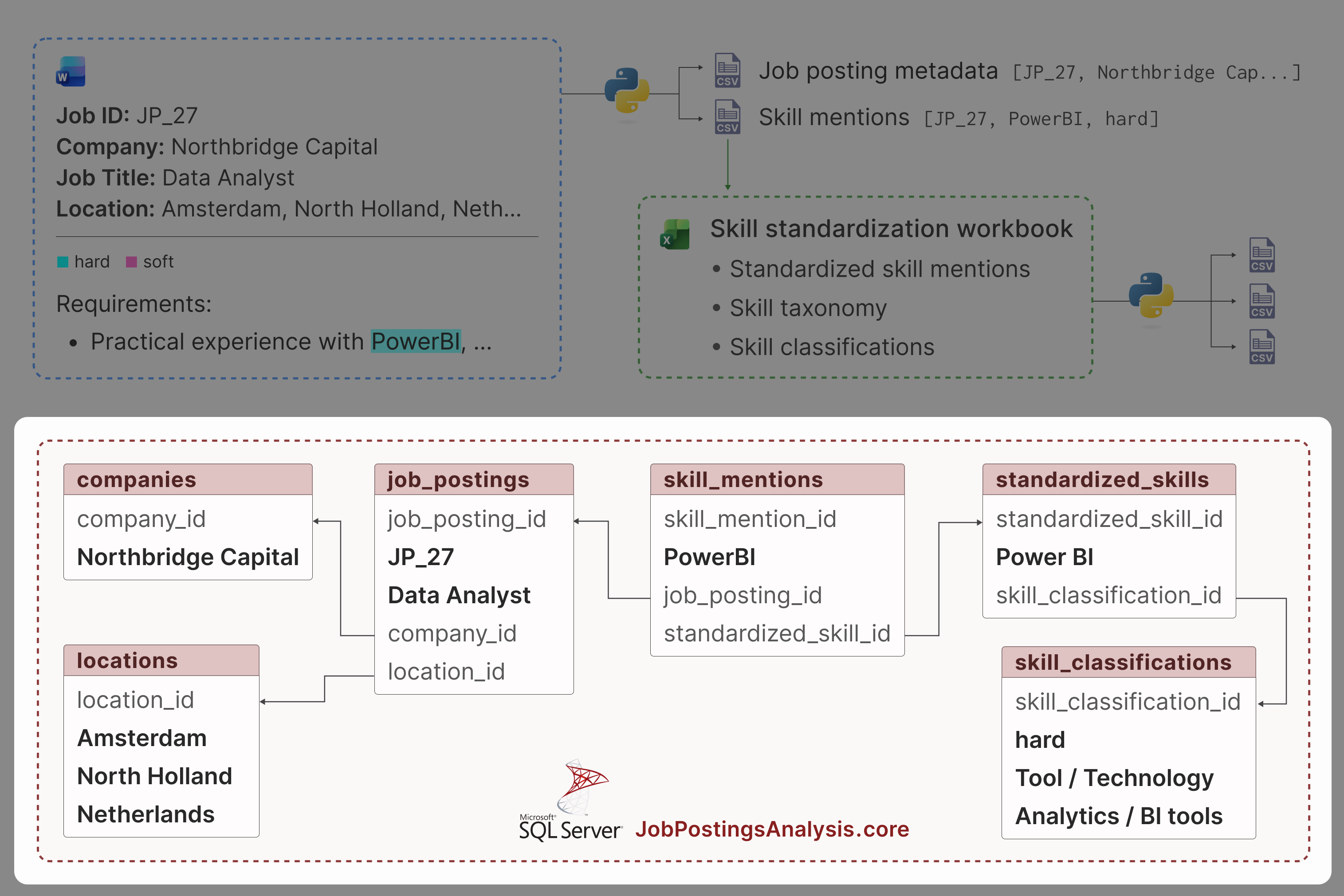
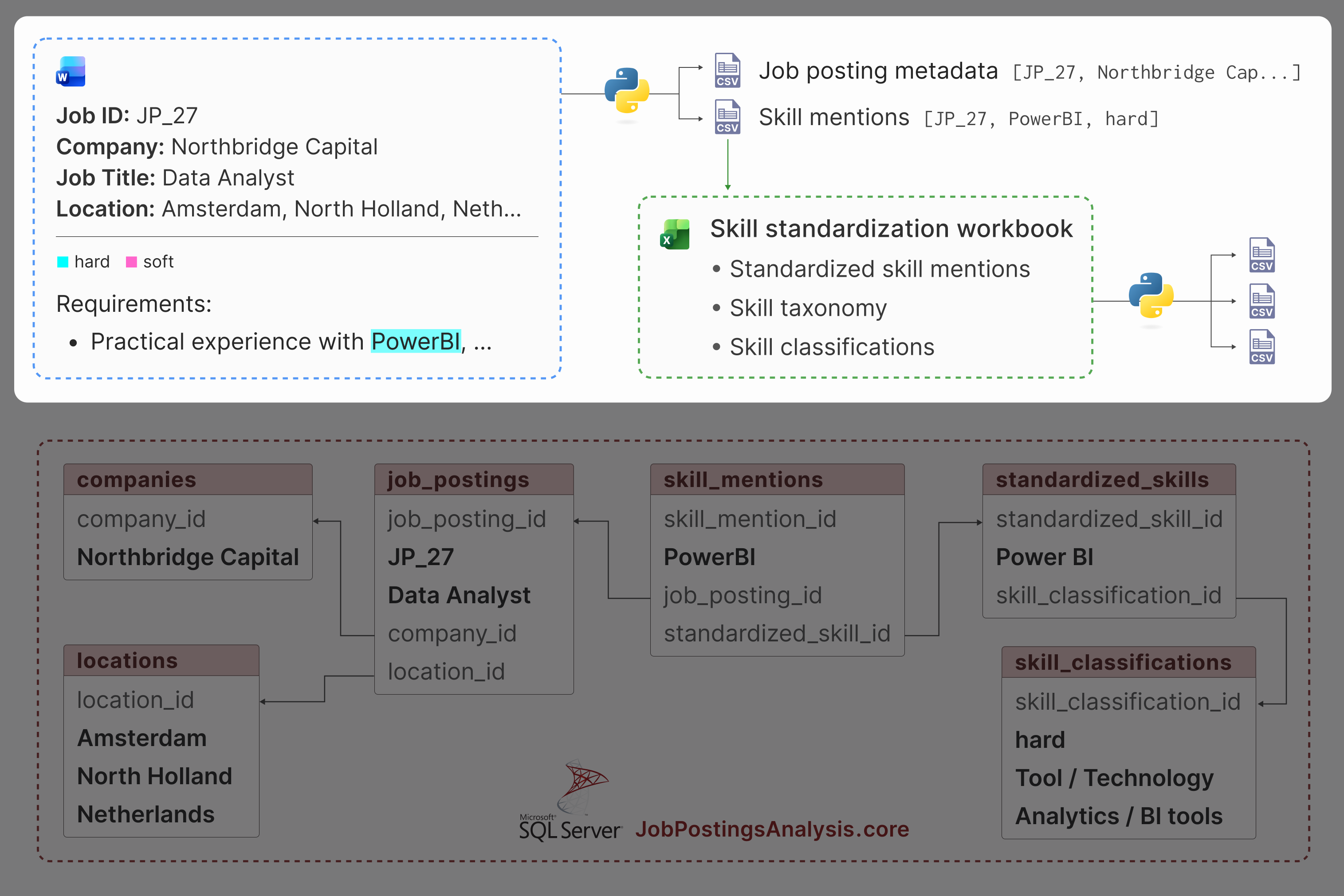
The diagram below illustrates how data flows through the ETL pipeline by tracing a single, concrete skill mention.
PowerBI is highlighted and extracted from JP_27 along with the
job posting’s metadata. PowerBI enters the skill standardization workbook and is standardized as Power BI,
while Power BI is classified as a hard skill, a Tool/Technology, and an
Analytics/BI tool.
The extracted datasets are loaded into the SQL Server database’s staging schema and then transformed into six relational tables in core. The resulting model provides a validated, consistent foundation for querying skill demand across job postings, companies, and skill classifications.